

|
|
|
|||||||
| Ebay/COMC/Online Selling/Shows/Paypal/Shipping Share online or show selling experiences. Ask questions about eBay, Paypal, COMC, shipping, etc... |
 |
|
|
Thread Tools | Display Modes |
 07-18-2025, 03:54 PM
|
#1 |
|
Member
|
 Scanning mini cards with Fujitsu
Wondering if any one else has this issue. I have many early 2000's Allen & Ginter, Topps 206 and other Mini cards. The size is about 1.5 x 3 inches.
I use a Fujitsu 8170 front load scanner. When I scan them they either get stuck or the image comes out stretched or chopped. I have tried adjusting the image size to 2x4 or the preset business card option but had no luck. I do have a flatbed, but the thought of scanning each front and back and then having to rename them for bulk listing gives me a headache. Any thoughts would be appreciated, Jim |

|

|
|
07-18-2025, 04:42 PM
|
#2 |
|
Member
Join Date: Apr 2012
Location: Virginia Beach
Posts: 5,636
|
how about putting them in a sleeve and top loader then running them through.
|
|
|
|
|
07-18-2025, 05:31 PM
|
#3 | |
|
Member
|
Quote:
|
|
|
|
|
|
07-19-2025, 01:31 PM
|
#4 | |
|
Member

|
Quote:
__________________
If you can not ship within 48 hours, please let me know before I pay |
|
|
|
|
|
07-20-2025, 11:51 AM
|
#5 |
|
Member
|
Thanks for the replies.
I don't like to scan cards in holders. Any mark on the holder will show and you can get flashback from the soft sleeve. It would also be time consuming to put them in the holders then to take them out for inventory storage. Jim |
|
|
|
|
07-21-2025, 10:21 AM
|
#7 |
|
Member
Join Date: Apr 2012
Location: Virginia Beach
Posts: 5,636
|
what about a card saver?
|
|
|
|
|
07-23-2025, 12:21 PM
|
#8 |
|
Member
|
Thanks for the replies, but sleeves and card savers are the same issue. The plastic shows every line or scratch. The sleeves give a flashback from the light.
Also the results are the same sometimes, with the image being stretched out. Jim |
|
|
|
|
07-23-2025, 05:35 PM
|
#9 |
|
Member
Join Date: Jul 2007
Posts: 1,093
|
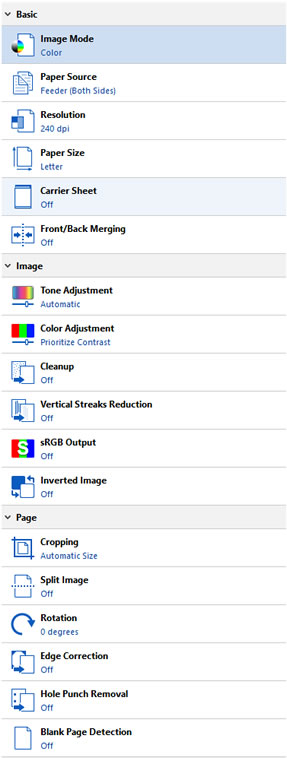
I've never seen any difference when scanning mini cards as opposed to regular sized cards. Here are the settings I use for both:
__________________
Always Buying Singles (base, rookies and inserts) from all NEW football releases. |
|
|
|
|
07-30-2025, 01:35 PM
|
#10 |
|
Member
|
I spoke to customer support at Fujistu/Ricoh. We determined that these cards are a touch too small for the scanner. I think the minimum size was 1.9 inches where this is 1.5.
They did recommend cleaning the rollers which helped a little. My best results came after cleaning and adjusting the DPI to 600. I also widened the margins to the highest 5mm. Some still came out a little uneven, like they were piecing it together. This may be the best we can do. Jim |
|
|
|
|
| Bookmarks |
|
|


 Linear Mode

